The official launch describes a research preview. A waitlist registration or an Ultra subscription does not by itself confirm Genie 4 access.
Use the official access route
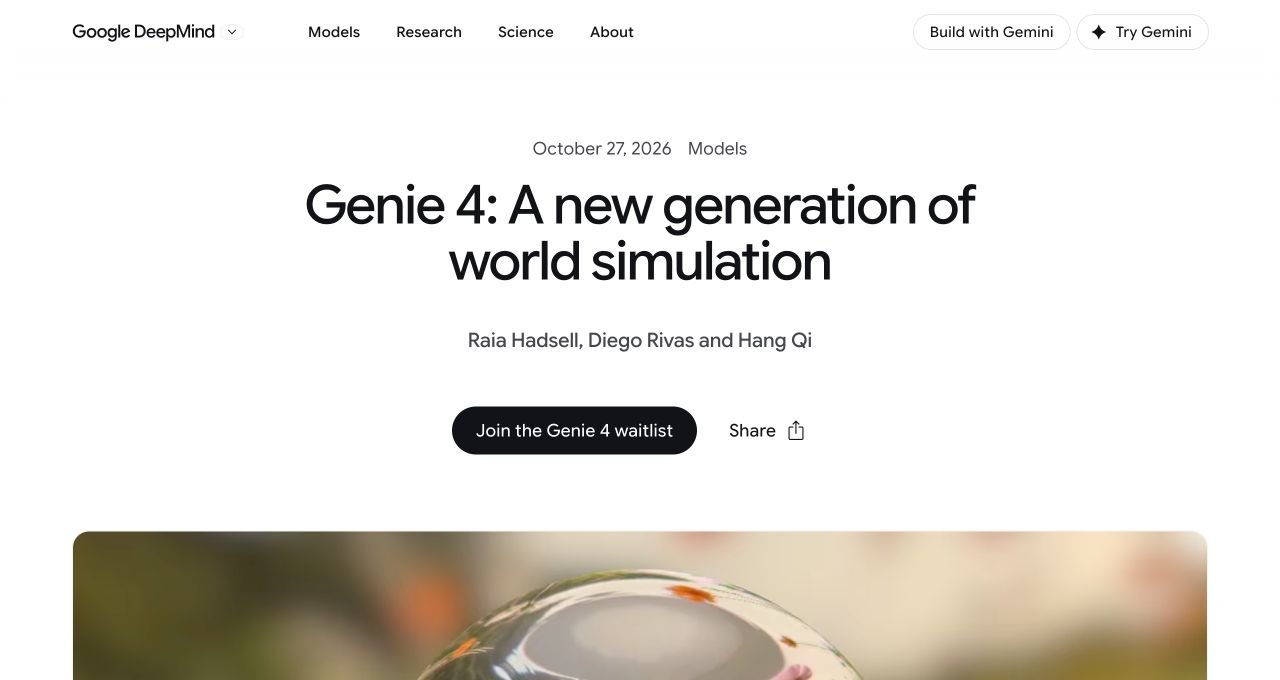
Begin at Google DeepMind’s launch announcement and follow its waitlist link. Going through the source lets you check that you are requesting the model you intended, rather than signing up for an unrelated product with a similar name.
- Open the official launch page shown below.
- Choose Join the Genie 4 waitlist.
- Read the form’s current eligibility and information-use text before submitting it yourself.
- Keep the confirmation. Do not interpret joining as approval or as a promised delivery date.
Should you subscribe just to try Genie 4?
Our recommendation: wait for explicit access confirmation if Genie 4 is your only reason to subscribe. A future rollout is different from a feature already available in your account. Before making a purchase, answer three questions:
- Does the current product page explicitly say Genie 4 is included for your account and location?
- Would the subscription still be useful to you if Genie 4 access took longer than expected?
- Do you understand the billing period, renewal price, and cancellation route?
If any answer is unclear, watching the demos and preparing a prompt costs less than subscribing on an assumption. This is a practical buying framework, not a prediction of Google’s rollout.
What pricing is actually confirmed?
The Genie 4 announcement does not give a standalone public price, per-session fee, or API rate card. Check the current Google subscription page for the plan price in your country. A plan price should not be relabeled as “the Genie 4 price.”
For a comparison, keep three items separate: the subscription bill, the features explicitly included now, and any future API usage charges once documented. A screenshot or an old promotional price cannot establish all three.
The current Project Genie help page describes that product’s eligibility. It should not be read as a guarantee that the newest announced model has reached everyone.
If you have Ultra but cannot open it
Check the signed-in account first. It is easy to open a second personal account in the same browser. Next, compare the product’s eligibility message with the plan attached to that account. Save the exact message and date before contacting support.
Our suggested support note: “I am signed in with the account that holds my membership. The product shows [exact message]. I am asking about [Project Genie access / Genie 4 specifically].” Do not include passwords, payment-card details, or API keys.
If Project Genie works but you cannot find Genie 4, that is a model-rollout question rather than a password problem. Check official updates before buying a second plan.
Announcement date is not general availability
Genie 4 was announced on 27 October 2026. That date identifies the research announcement; it does not establish public access everywhere. This page was checked on 30 October 2026 against the sources below. If Google updates the rollout, the official product message and current terms take precedence over this dated guide.
Sources & method
Checked against the official sources below on 30 October 2026. Screenshots document public pages or official demos. We have not claimed firsthand Genie 4 access; suggested exercises, examples, and decision checklists are our editorial guidance.
- Google DeepMind: Genie 4 launch announcement ↗
- Google DeepMind: Genie 4 model page ↗
- Google Labs Help: get started with Project Genie ↗
Access, product limits, and eligibility can change. Follow the current message in Google’s product and its published terms.