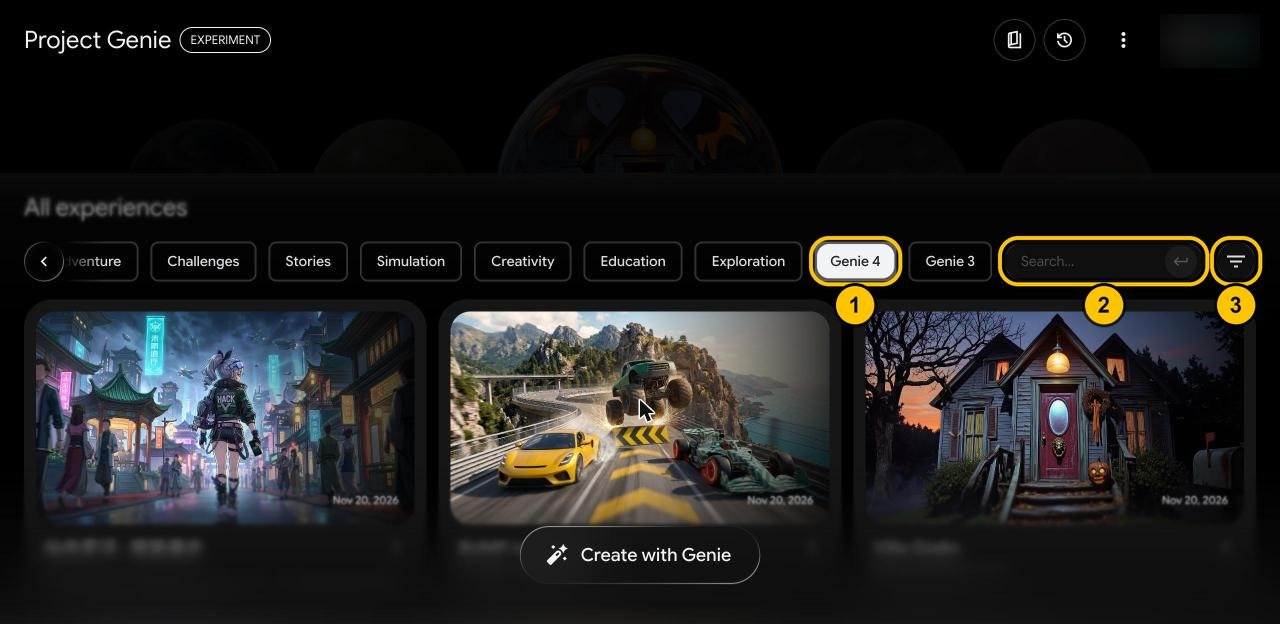
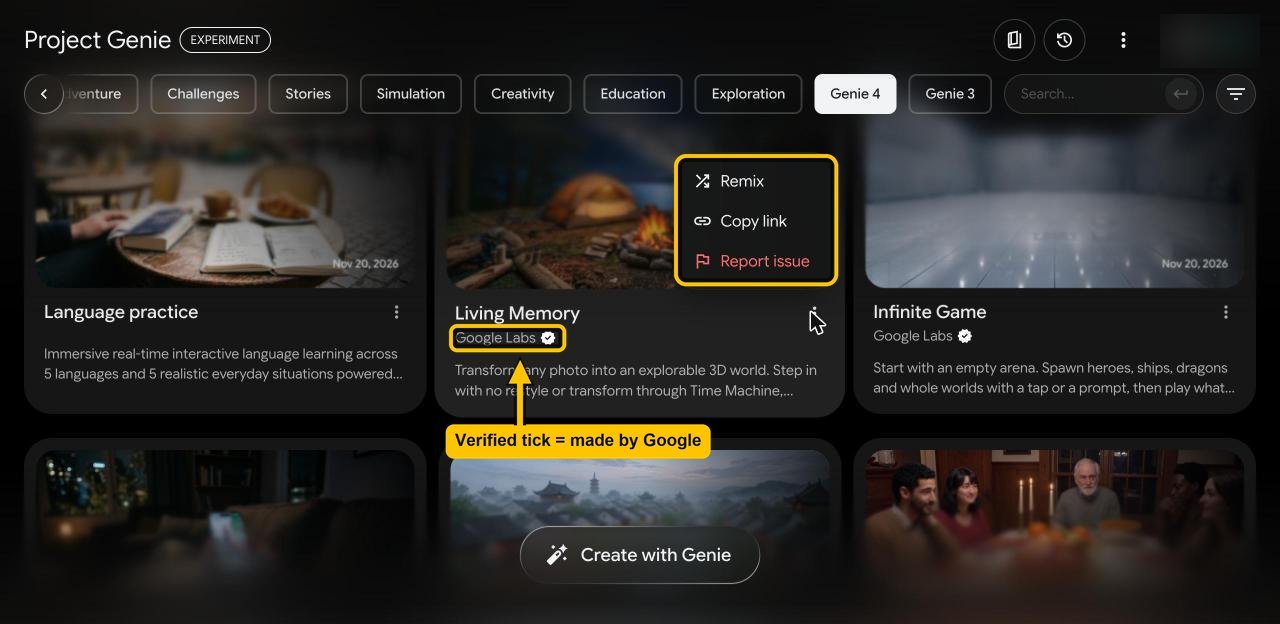
On the Project Genie homepage, scroll to “All experiences” and click the Genie 4 filter. A blue tick next to the creator’s name means Google made it. Each card’s ⋮ menu lets you Remix it into your own projects, Copy a link, or Report an issue.
Step 1 — Filter to Genie 4
Scroll down to All experiences. Scroll the category chips to the right and click Genie 4 (①). Use Search (②) for a topic, and the filter button (③) for more sorting and filtering.
Step 2 — Read the card, then use ⋮
Each card shows the experience name, its creator and a one-line description. A blue tick means Google made it. The ⋮ menu has three options:
- Remix copies it into your projects so you can change it with the builder;
- Copy link lets you share it;
- Report issue flags a problem.
Picks by goal (Genie 4 filter, 20 November 2026)
These are from the gallery listing on the day we checked. The descriptions are the creators’ own, and the gallery changes often.
| Your goal | Try | What it does (from its card) |
|---|---|---|
| Use your own photos | Living Memory (Google Labs) | Turns any photo into a world you can explore, with styles like Time Machine, Plush and Origami. |
| Make your own game | Infinite Game (Google Labs) | Starts with an empty arena. Add heroes, ships or dragons with a tap or a prompt, then play. |
| Explore with a guide | World Scout (Google DeepMind) | Explore worlds with a companion called Scout. |
| Learn something | Language practice | Practise five languages in five everyday situations. |
| A puzzle | Villa Giallo | Search a haunted 1970s villa for clues to unlock each room. |
| Something unusual | The Life of Ants | Spend a day as a worker ant. |
Gallery tips
- Remix instead of starting from scratch: a remixed experience opens in the Experience builder, where you can change it the way we describe in the builder guide.
- Use Visit history to find things again: everything you play is saved there.
- If an experience won’t load, Project Genie may have hit its busy limit. Try again later.
Sources & method
We tested this ourselves on 20 November 2026 in a Project Genie account that got access through Google AI Pro. Every screenshot comes from that session. The arrows, boxes and numbers are ours, and personal account details are blurred. Project Genie is an early research prototype, so the screens and limits may change.
- Project Genie (Google Labs), tested 20 November 2026
- Google Labs waitlist email: “You’re in! Start exploring Project Genie”
- Google DeepMind: Genie 4 launch announcement
Access, product limits, and eligibility can change. Follow the current message in Google’s product and its published terms.